How to Authenticate Products with QR Codes: A 7-Step Implementation Guide

QR code product authentication is not simply a code opening a web page. It connects a physical item to the intended digital record, gives the customer a clear checking step, and creates an event that the brand can review. Product identity, label design, customer messaging, and company records must therefore work as one flow.
The customer journey can be short: scan the code with the specified application, enter any concealed authentication detail, and read the result. The brand’s work starts earlier. It must decide which code belongs on each pack, how labels enter production, and who investigates an event that needs an explanation.
This guide focuses on building that operating flow rather than generating a QR image. It does not promise an uncopyable symbol or a conclusive guarantee of authenticity. The aim is to preserve the product-to-code relationship, make reuse visible, and help teams review suspicious activity against company evidence.
Which two needs sit behind a QR product authentication search?
Current search results reveal two related expectations. A customer wants to know how to scan a product and interpret the screen. A manufacturer or brand owner wants to understand the unique identity, packaging controls, record ownership, and monitoring process behind the same experience.
A useful implementation addresses both sides. Telling a customer only to scan the QR code leaves the supporting record unclear. Giving a brand a long technical feature list can overlook the questions that arise at the actual point of use.
- Customer question: Where should I scan this code, and what result should I expect?
- Brand question: How will every pack match the correct unique record?
- Operations question: Who acts when reuse or unexpected activity appears?
Is every QR code an authentication code?
No. A QR code is a data carrier that can contain a link or an identifier. GS1’s overview of two-dimensional barcodes explains that QR codes can carry product identifiers and connect users to online information. The presence of a code, however, does not by itself establish a conclusion about the physical item.
A shared QR image printed on every package can open product information, but it does not distinguish one pack from another. Item authentication requires a distinct identity for each saleable unit, a reliable connection to the intended product record, and managed use history.
Copying the visible code must also be treated as a design assumption. The GS1 digital signatures standard explicitly discusses the risk of replicating a QR image onto another label. A unique identity, concealed factor, and prior-use check therefore address different parts of the problem.
How do you implement QR code authentication in seven steps?
Implementation should begin with a risk and record decision, not a print file. The following sequence applies to a small pilot or a wider operation, although the detail will vary with the product, packaging, and distribution model.
- Write the authentication objective: Define one priority, such as customer checking, copied-code visibility, or channel review.
- Select the identity level: Decide whether the question requires product-type, batch, serial, or individual-item identity.
- Connect code and product record: Link the identity to the correct product, variant, package, and relevant production record.
- Test the label: Check QR readability, PIN concealment, adhesive, surface, and placement on the real package.
- Write the customer journey: Specify scanning, PIN entry, result messages, and the route to official support.
- Build the company review: Assign an owner to evaluate prior use, time, and location against company evidence.
- Approve pilot criteria: Verify matching, readability, messaging, and exception handling before wider release.
This order prevents the QR symbol from being mistaken for the whole solution. The code becomes useful when connected to a product record, correct physical application, and a review process that people can operate. The broader architecture is covered in the product authentication system guide.
How does a customer authenticate a product with a QR code?
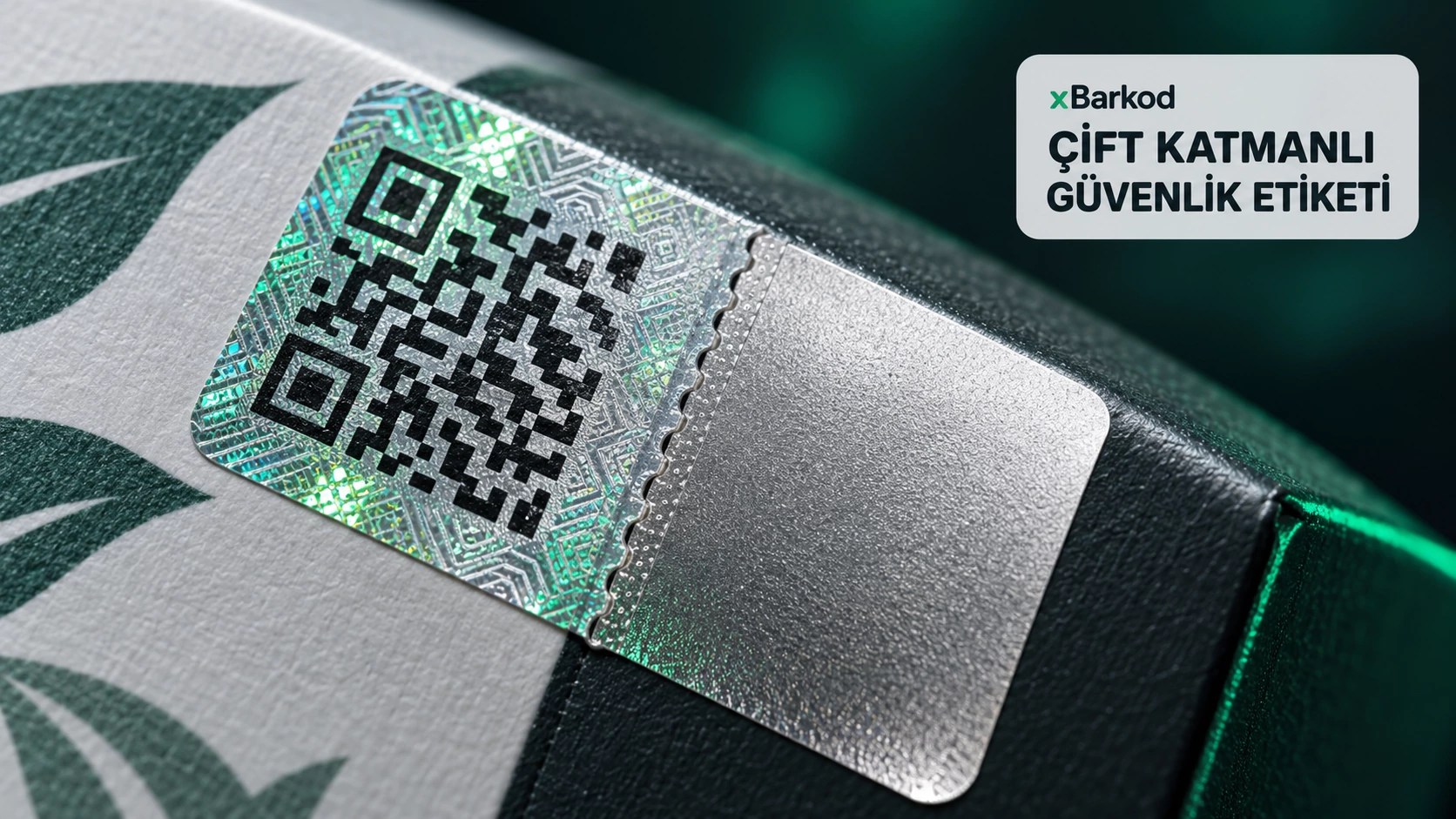
Customer instructions should be short and sequential. In the xBarkod flow, the user scans the label’s QR code with the xBarkod App, opens the scratch-off area, enters the concealed PIN, and reads the authentication result. The user can be warned if the code has prior use or the system identifies suspicious activity.
The result should not depend on a colour or icon alone. The customer needs enough information to compare the named product with the package, understand a prior-use warning, and reach an official brand support route. Ambiguous messages that tell a customer to continue using a questionable product should be avoided.
- Check that the label is in the brand’s stated position on the product.
- Scan the QR code with the specified application.
- Open the scratch-off area yourself and do not share the PIN.
- Compare the displayed product and use information with the package.
- If a warning appears, retain the package, proof of purchase, and screen result when contacting the brand.
Which records should the brand review together?
An authentication screen is not an incident-management process. The brand should first confirm the product record connected to the code. Prior use, time, and location can then be compared with production, dispatch, order, return, and support records. A signal becomes explainable or suitable for escalation only within that context.
A repeat scan does not always mean that a code was copied. The customer may check the result again, or a support agent may perform a review. By contrast, unexplained uses in distant places, the same code appearing on different packages, or a mismatch between displayed product and packaging justify collecting more evidence.
| Signal | First check | Supporting company record |
|---|---|---|
| First authentication | Product and code match | Production or label-application record |
| Repeated use | Prior time and use context | Support, return, or customer report |
| Unexpected location | Permission and location quality | Dispatch, dealer, or order record |
| Product mismatch | Master record linked to the code | Package image and batch record |
What should happen if a QR code is copied?
A copied visible QR code may open the same digital record, so the design must not assume that an opening page proves the item genuine. A scratch-off PIN that remains concealed until use adds a second check against simple image copying. Prior-use history can also turn another appearance of the same identity into a review signal.
A warning is still not an automatic counterfeit verdict. The brand should inspect the code record, package, purchase channel, and use history. The guide to copied QR codes and second-layer controls explains the boundaries of visible and concealed factors in more detail.
Why is label application part of digital authentication?
If the correct code is applied to the wrong item or to a surface from which it can be moved easily, the connection between database and package weakens. Label size, adhesive, scratch-off area, opening point, and QR placement are therefore operating controls rather than decorative choices.
A pilot should reproduce real packaging, production-line lighting, and expected customer handling. Unused, damaged, and reprinted labels also need controlled statuses. The product security label selection guide provides a complementary checklist for those physical decisions.
Where does xBarkod fit in this workflow?
The xBarkod product authentication system supports a unique QR code and concealed scratch-off PIN for each product, customer authentication through the xBarkod App, and company-side monitoring of authentication activity. Product, time, location, and prior-use information become visible in the company dashboard for review.
These capabilities help a brand manage product-to-code relationships and field signals. They do not analyse product contents like a laboratory, and they cannot guarantee the elimination of counterfeiting. Their value depends on connecting the authentication event to packaging, production, dispatch, and customer-support processes.
Do not limit an evaluation to the number of listed features. Select one product family, a real package, and an accountable team, then test how the xBarkod workflow supports correct matching, clear customer messages, and evidence-based company review.
Which acceptance criteria should a pilot use?
A pilot is not complete merely because a QR code opens on a phone. It should demonstrate that product identity survives from production to customer checking, that errors can be distinguished, and that warnings reach a responsible person. Write the criteria before labels enter the process.
- Does every test code open the intended product record?
- Can customers scan the QR code and use the scratch-off area on the real package?
- Do first and subsequent checks show the intended messages?
- Does the dashboard event match the expected product, time, and use information?
- Can the assigned owner decide what to do with a damaged label, return, or unexplained repeat?
- Is the customer support route clear from a warning screen?
Do not turn the results into a universal success rate. Review the matching errors, unreadable labels, explained repeats, and unresolved events in your own pilot. A wider rollout should depend on the company’s baseline and its stated acceptance threshold.
Frequently Asked Questions about QR code product authentication
What is QR code product authentication?
It is the process of scanning a QR code connected to a specific product, entering any concealed factor, and comparing the result with a digital record. A complete workflow joins the customer result to an event the brand can review.
Does every QR code scanned by a phone authenticate a product?
No. Some codes only open a shared web page. Authentication requires a code connected to the correct product record and, where item-level control is needed, a unique saleable-unit identity and managed use history.
Why should an authentication QR code be unique?
A unique code distinguishes one pack from the others and lets the system maintain history for that identity. If every unit uses the same code, the brand cannot tell which physical pack was checked.
What does a scratch-off PIN do?
It adds information that remains concealed while the QR code is visible. This creates an additional check against simple copying of the QR image, although controlled printing and label application remain necessary.
Does a second use prove that a product is counterfeit?
Not by itself. A customer recheck, support action, or return may be legitimate. Time, location, product, purchase, and prior-use evidence should be reviewed together before a decision.
Does xBarkod require an application for authentication?
Yes. In the documented xBarkod flow, the customer scans the QR code with the xBarkod App and enters the concealed PIN beneath the scratch-off area to view the result.
Can QR authentication eliminate counterfeiting?
No single technology guarantees that outcome. Unique identity, concealed control, correct label application, company evidence, and incident handling work together to make risks more visible and reviewable.
Conclusion: Manage the authentication flow, not the QR image
The value of QR product authentication comes from connecting the correct physical item to a reliable digital record, not from the visibility of the symbol. Customer instructions, unique identity, a concealed PIN, prior-use checking, packaging discipline, and company review must be designed together.
Begin with one product family and one authentication objective. Test xBarkod’s unique QR code, scratch-off PIN, xBarkod App, and company dashboard on the real package, then use a measurable pilot to verify matching, customer use, and exception handling before broader rollout.
More Articles
Food Lot Tracking: A Practical Guide from Records to Recall Readiness
Build food lot tracking with current batch rules, linked ingredient-production-dispatch records, recall drills, and item-level authentication controls.
QR Code Authentication for Textile Products: An E-Commerce Brand's Daily Workflow
Learn how an e-commerce textile brand manages QR authentication through product coding, label application, dashboard review, and suspicious-use checks.

Counterfeit Product Detection Systems: From Signal to Decision
Learn how to build a counterfeit product detection system using item identity, authentication signals, channel records, case review, and a controlled pilot.