How Does a QR PIN System Work? Data Flow and Control Points
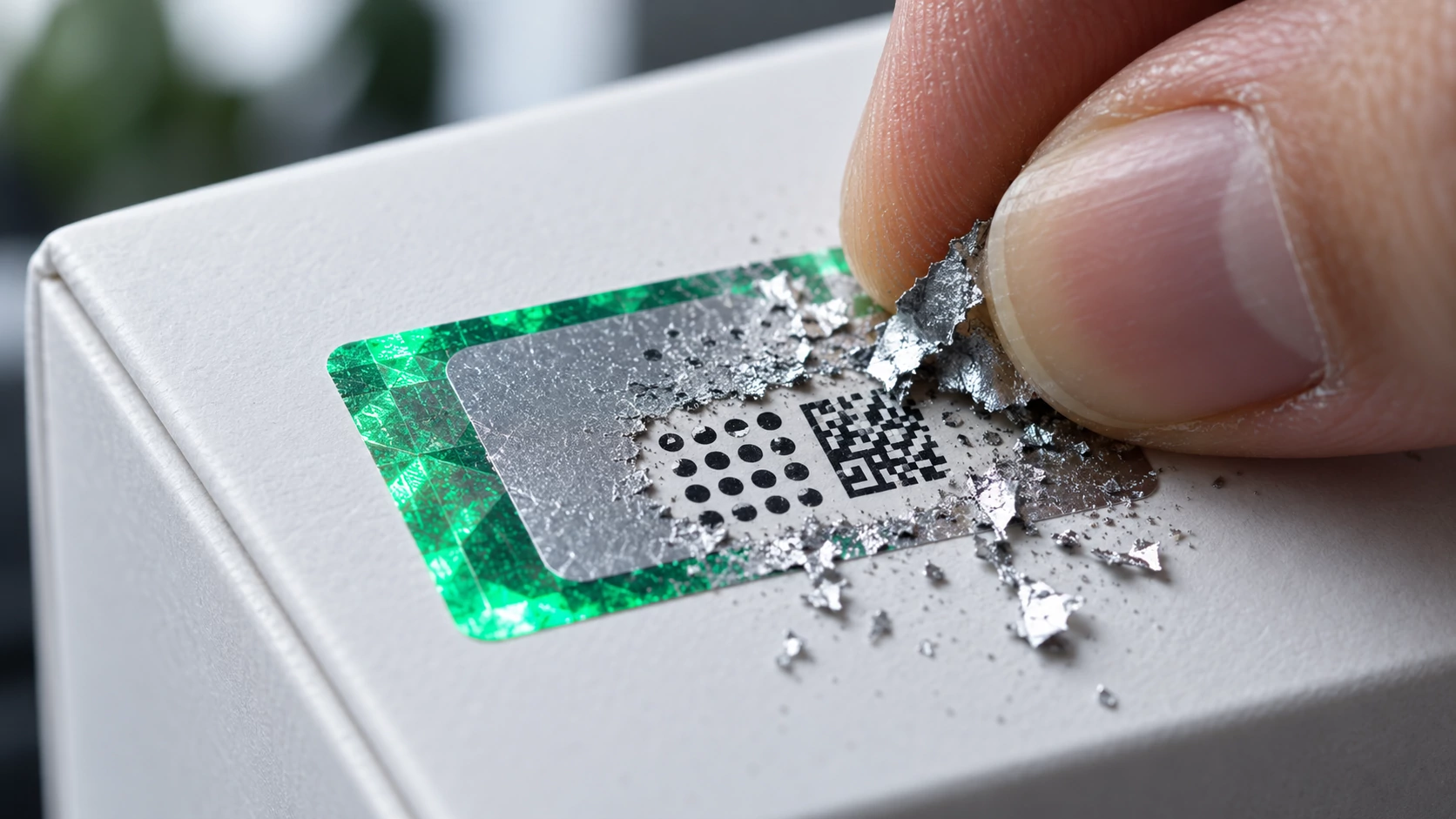
A QR PIN system links each physical item to a unique record. The customer scans the visible QR code, reveals and enters the hidden PIN, and the system compares both values with the registered item. The response can show not only whether the pair is valid but also whether that record has been used before.
For a brand, the important part is not simply printing two codes on a label. The QR identity, hidden PIN, item record, verification response, and event history must belong to one controlled chain. If one link is ambiguous, neither the customer message nor the brand-side review will be dependable.
How does a QR PIN system work in one sentence?
The QR code is the visible layer that starts a verification request for a specific item record. The scratch-off PIN is a second value kept out of view until the customer opens the panel. The system tests whether the QR identity and PIN belong together, checks usage status, and returns a defined result.
This flow is not a magical guarantee about everything inside the package. It provides a signal about whether the item carries a code pair registered by the brand and how that pair has been used. Packaging condition, purchase channel, fulfilment records, and other evidence may still require review.
Which four records must be connected?
A reliable authentication flow separates four records before connecting them. A product-class barcode and an item-level verification identity are not interchangeable. The first may identify a type of product, while the second distinguishes one physical saleable unit from another.
- Product master: The product name, variant, and the brand’s internal reference.
- Item identity: The unique record assigned to one physical package.
- QR-to-PIN mapping: The relationship showing that the visible QR identity and concealed PIN belong to the same item.
- Verification event: The result, time, usage state, and any other review signals the system supports.
The GS1 implementation guideline for 2D barcodes explains that a QR code is not inherently secure or insecure; the scanning software and surrounding process determine the outcome. It also notes that serial, batch, or other granular identifiers can improve the ability to distinguish the product being handled.
What happens after the customer scans?
The customer sees a short interaction, but the decision sequence behind it should be explicit. The application reads the QR identity, calls the relevant item record, requests the concealed PIN, and compares the entered value with the verification data for that same item. It then determines usage state, records the event, and presents a clear response.
- The QR code starts the verification flow for a specific item identity.
- The service checks that the item record exists and is eligible for verification.
- The customer reveals the scratch-off area and enters the hidden PIN.
- The QR identity and PIN are matched on the service side.
- A defined state such as first use, prior use, or invalid input is selected.
- The result is shown to the customer and the event becomes available for brand-side review.
The brand should document each hand-off in this sequence. Generating a code, converting it into a label, applying the label to the correct item, and supporting the customer are separate control points. A record that says “label produced” is not proof that the label reached the intended product.
Why do the QR code and hidden PIN have different jobs?
The QR code is exposed so that it can be scanned easily and take the customer to the right flow. That same visibility means its image can be copied. It is therefore more useful to treat the visible QR as an item-specific entry point than as conclusive evidence on its own.
The hidden PIN serves a different purpose. Keeping it concealed until the scratch-off panel is opened adds a physical control point tied to the package in the customer’s possession. The PIN still has to match the right QR identity, its usage state has to be checked, and unusual attempts need a defined review route.
How should the result be explained?
The result screen should translate system state into plain language. A valid first check, a previously used record, a mismatch, and a technical failure need different messages and different next steps. Vague errors make it difficult for customers and support teams to distinguish risk from typing or connectivity problems.
- Valid first verification: The QR and PIN match, with no earlier successful use shown by the system.
- Prior use: The same item record has been verified before; this is a review signal, not automatic proof of counterfeiting.
- Mismatch: The QR identity, PIN, or item state does not satisfy the expected rule.
- Technical failure: The service could not reach a decision, so the customer should receive a safe retry or support path.
Context matters most when the system reports prior use. A customer may have checked the item twice, a support agent may have run a test, or a return process may have triggered another scan. Time, order, return, and support records help the brand separate explainable repeats from unresolved activity.
What does the event history add?
If a system returns only an immediate answer, brand visibility remains limited. An event record brings the item identity, result, prior-use state, and supported time or location signals into a review queue. Those signals become operationally useful when compared with dispatch, order, return, and customer-support records.
A burst of checks or activity in an unexpected city may justify review, but location alone does not prove a counterfeit item or channel violation. Travel, gifts, resale, repeat checks, and imprecise location permissions may provide reasonable explanations. A review file should preserve those possibilities instead of turning a signal into a verdict.
What should a brand review each day?
Daily operation does not mean reading every successful event. The brand should define priority rules for prior use, repeated failed PIN attempts, unexpected time-location combinations, or customer reports. Each rule needs an owner, a response window, and a list of company records to consult.
A first-line team can complete item, order, and support context. Unexplained cases can move to quality, brand protection, or an authorised manager. Decisions with legal or commercial consequences should not rely on the authentication dashboard alone; they need authorised review and supporting evidence.
- Does the item identity belong to a unit that was actually released or dispatched?
- Is the event time consistent with fulfilment and delivery records?
- Can prior use be explained by support, returns, or quality control?
- Is there a customer report or a photograph of the physical package?
- Were the review conclusion and follow-up action recorded?
What belongs in the technical control checklist?
Testing whether a camera can read the QR code is not enough. Code lifecycle, PIN concealment, mapping logic, failed-attempt handling, customer messaging, event history, and access control should be tested together. A brand does not need to assume a provider’s internal architecture; it can define acceptance criteria through observable business outcomes.
- A separate item identity for every saleable unit
- Correct mapping of the QR and PIN pair to the item record
- PIN concealment through application, packing, and dispatch
- Different responses for first and repeat use
- Clear handling of incorrect input without misleading the customer
- Role-appropriate event visibility in the company dashboard
- A documented hand-off from support to event review
These controls cannot promise absolute protection. They can make copied images, wrong item mappings, and repeated use visible and reviewable. The objective is not to claim that counterfeiting disappears; it is to create a dependable control structure between item identity and field activity.
Where does xBarkod fit into this flow?
According to the live product description, the xBarkod product authentication system creates an item-specific QR code and scratch-off hidden PIN. The customer scans the QR code in the xBarkod App, enters the PIN, and sees the verification outcome. The brand can monitor verifications and suspicious activity in its company dashboard.
Those verified capabilities do not replace the brand’s product master, label-application checks, dispatch records, or case decisions. xBarkod provides the authentication layer; the brand still needs to own operational item-to-code mapping and the way dashboard signals are compared with company records.
A pilot on one product family can test QR-to-PIN mapping, first and repeat use, customer messages, and dashboard visibility on the real package. This turns the evaluation from a presentation exercise into a controlled test inside production and support operations.
Which scenarios should a pilot cover?
A pilot should do more than display one successful result. It should include incorrect, reused, cross-mapped, and physically damaged label scenarios. For each test, the expected customer message, company-side event record, and responsible team should be written before execution.
- Correct QR and correct PIN on first use
- A second check of the same valid pair
- A correct QR combined with a PIN from another item
- Incomplete or incorrect PIN attempts
- A label applied to the wrong product variant
- A legitimate repeat check during a return or support case
- The customer message shown during a connectivity failure
- Escalation of a suspicious event from the dashboard to an authorised team
Acceptance should depend on the expected outcome appearing in every scenario. When a test fails, the cause may be product data, label instructions, training, or support workflow rather than software alone. The pilot report should make those sources visible and assign corrective ownership.
Related implementation guides
For ownership and rollout decisions, see the QR code and scratch-off PIN implementation guide. For the concealed code lifecycle, read the scratch-off code verification flow. The copied QR code guide explains why the visible image needs additional controls.
Frequently asked questions about QR PIN systems
How does a QR PIN system work?
The visible QR identity opens the registered item flow, and the customer enters the PIN hidden under the scratch-off area. If both values map to the same item, the service checks usage status, returns a result, and records the verification event for brand-side review.
Is a QR code alone enough to authenticate a product?
Not in every design. A visible QR image can be copied or may lead only to a shared product page. Item-level identity, a concealed PIN, usage history, and a brand review process provide additional control points.
Why must the scratch-off PIN remain hidden?
Keeping the PIN concealed until the customer opens the panel adds a physical checkpoint to the visible QR. A panel found already open may justify review, although it does not by itself prove that the product is counterfeit.
What does a previously used PIN mean?
It means the same item record has an earlier successful verification. A repeat customer check, support action, return, or quality-control step may explain it, so the brand should examine time, order, and support context.
What if the QR code and PIN belong to different items?
A system that checks mapping should not return a successful result. The brand should investigate a possible label-application error, data-mapping problem, or suspicious attempt and preserve the event for follow-up.
Can a QR PIN system eliminate counterfeit products?
No. It makes item identity, usage state, and verification events visible and strengthens risk review. It still needs packaging, production, dispatch, sales-channel, and customer-support controls around it.
Conclusion: connect two codes to one decision chain
The strength of a QR PIN system does not come from printing two values side by side. It comes from turning a unique record tied to the right physical item into an understandable result at verification time. Product data, label application, usage history, and event review must be designed as one operating model.
Once item mapping and acceptance scenarios are ready, test xBarkod’s verified QR, hidden PIN, prior-use check, and company-dashboard flow on one product family and its real packaging. Judge the solution by exception clarity and daily operating fit as well as the successful screen.
More Articles

Product Authentication Code Mapping: A Daily Workflow for Private Label Brands
Learn how private label brands map authentication codes to products, manage QR and hidden PIN checks, review dashboard activity, and investigate suspicious use.

Product Authentication System Setup: A Daily Workflow for E-Commerce Brands
Set up product authentication with clear records, unique codes, QR and hidden PIN checks, dashboard review, and suspicious-use handling for e-commerce brands.

Product Authentication Location Tracking: From Setup to Daily Review
Build product authentication location tracking with clear permissions, data quality, daily review, privacy controls, and practical pilot criteria.